A piano roll: pitch up the side, time across the page, one rectangle per note.
A piano roll is a grid of notes — pitch on the vertical axis, time on the horizontal, and one rectangle per note event. That is not an analogy for a MIDI export; it is a literal description of the data. The site's measured export of a 4.40-second mix is thirteen rectangles on five lanes, with onsets spanning 3.902 seconds of the 4.40-second recording. The figure below is that export, drawn — the same events, readable in one look.
Convert a clip and see your own eventsHow to read the roll below
Each horizontal lane is one pitch — here A3, A4, C5, D5 and E5, from low to high. Each rectangle is one note event: its left edge is the onset, its width is the duration, its lane is the pitch. The source is the site's own /examples/midilace-mix-test.wav (4.40 seconds, mono, 22,050 Hz), and its exported MIDI is downloadable below so the drawing can be checked against the file.
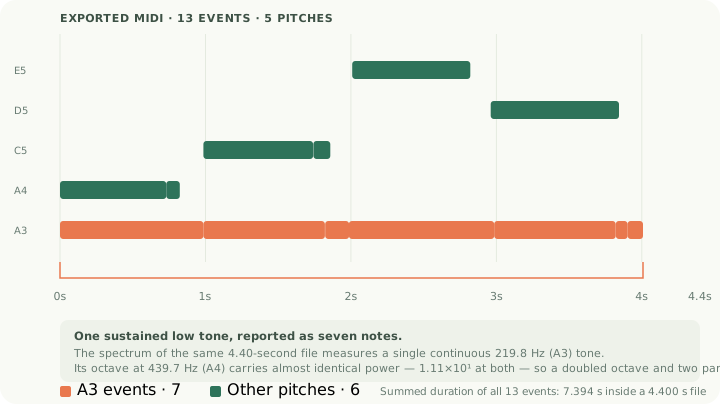
Two things are visible in the roll that a note list hides. First, the low lane holds seven rectangles where the measured spectrum shows one continuous 219.8 Hz tone — chopping you can see. Second, the rectangles overlap in time: the export's note time totals 7.394 seconds inside a 4.40-second recording, and 11 of the 13 events sound while another event is still sounding — simultaneity a list of notes cannot show at all.
The same drawing at real-recording scale
The mix is synthetic and small. Two of the site's real recordings show what a working roll looks like — and why editors open one before touching a note.
| Recording | Roll contents | Note time | What the roll shows first |
|---|---|---|---|
| 5.0 s piano (WAV) | 30 rectangles on 8 lanes, C4 to G5 | 15.076 s in a 5 s file | Stacks of 3–5 simultaneous rectangles where chords were played |
| 12 s solo guitar (MP3) | 68 rectangles on 19 lanes, G#2 to C7 | 22.886 s in a 12 s file | A high lane of octave artefacts (up to C7) sitting above the real line |
| 4.40 s hum take | 32 rectangles on 4 lanes, each 0.059–0.188 s wide | 3.777 s | One sustained tone chopped into 32 near-touching rectangles |
The piano row is the one to study if you edit transcriptions: 30 rectangles that total 15.076 seconds of note time inside a 5-second recording means most events overlap — chords are stacks, and a stack is where wrong notes hide. The hum row is the other failure mode at its purest: no chords at all, one tone, still chopped into 32 pieces.
What the roll shows that a list of notes does not
Overlap becomes obvious. In a list, thirteen events look like thirteen notes. On the roll, lanes stacking vertically at the same moment show the simultaneity directly — on the measured file, 11 of 13 events overlap in time, and the 5-second piano export is denser still: 30 events on 8 pitches.
Gaps become measurable. The low lane's rectangles start at 0.000, 0.986, 1.823, 1.986, 2.985, 3.821 and 3.902 s. The 0.081-second and 0.163-second gaps are visible as near-touching rectangles, and they are exactly the places where the export split one gesture into two.
Lanes separate what a staff would mix. A roll keeps every pitch on its own lane permanently. On the measured file the bass lane's problem (seven rectangles, 4.006 seconds, one continuous tone) is isolated visually before any note is checked by ear — which is why editing a transcription almost always starts in a piano-roll view.
Using a roll as the editing surface
- Open the export in any DAW or MIDI editor; the piano-roll view is the default for good reason. It is the export's native shape.
- Read lane by lane, low to high. The low lane is where chopping concentrates: on the measured file, seven events that merge toward one held note covering 91% of the recording.
- Merge same-pitch rectangles separated by less than about 100 ms. On this file that is the whole bass fix, and the roll makes the candidates obvious.
- Check heights before checking widths. Events that sit several octaves above anything played are the classic export artefact — the site's voice test reached E7 (MIDI 100) against an annotated ceiling of E4, and the 12-second guitar export reaches C7 above an annotated top of C5. Sorting the roll by pitch puts them in one place.
- Print the roll if you want a visual handout. It is a legitimate chart for a band that reads rolls, and it shows overlap that a staff cannot draw without voice-separating first.
Questions about piano rolls
Is a piano roll the same as sheet music?
No. The roll is the raw event data as rectangles — pitch, onset, duration, nothing else. Sheet music is an engraving of that data with rhythm interpretation on top. The measured export needs both jobs done: merge the chopped low lane, then let notation software engrave a readable page.
Where does the name come from?
From player pianos: a physical roll of paper with holes punched where notes should sound, scrolling past a reader. The digital version is the same idea — time on the scroll, pitch across the width — which is why MIDI exports map onto it exactly.
Why do DAWs show piano rolls by default?
Because the data is a list of note events, and the roll is that list drawn. Nothing is lost in the translation, and the things that need fixing — chopped lanes, octave artefacts, overlaps — are visible at a glance.
Can a player read a piano roll as music?
Some can, and it is increasingly common in bands whose members produce. It carries no meter and no key, so it assumes the player already knows the tune's feel — the same assumption a lead sheet makes about style.
Can I try it on my own track?
Yes. The converter on the home page runs in your browser with no account, processes the recording on your device, and exports a standard MIDI file you can open in any DAW's piano-roll view.