Music engraving: the layout layer a converter export does not have.
Engraving is the craft of laying out notation so a musician can read it — staff spacing, stem direction, beaming, page turns. A MIDI export contains none of it: it stores pitches, onsets and durations, and nothing else. Measured on this site's own 4.40-second test file, one continuous low tone arrives as seven events an engraver would have to interpret before drawing a single stem. Transcription finds the notes; engraving makes them playable on paper.
Convert a clip and see the raw eventsWhat the export contains, field by field
The test file is the site's own /examples/midilace-mix-test.wav — 4.40 seconds, several tones sounding together — with its exported MIDI downloadable below. Parsed event by event, every field is either a pitch, a time, or a duration. There is no field for anything an engraver decides.
| In the export | Measured content | Engraving still has to decide |
|---|---|---|
| Pitch | 5 values: A3, A4, C5, D5, E5 | Staff position, clef, octave transposition for range |
| Onset time | 11 onsets from 0.000 to 3.902 s | Time signature, bar lines, which onset is a beat |
| Duration | 0.081 s to 0.999 s per event; 7.394 s total | Note value, ties, rests — and what to do with overlaps |
| Not present | No tempo, no key, no time signature, no dynamics | Meter, tempo marking, phrasing, articulation |
The second test pair makes the gap smaller and clearer: five intended audio notes became twelve exported events on five pitches (D4 to F5). The pitch list is short and readable; the page a musician needs is still a layout decision on top of it.
Three engraving decisions the measurements force
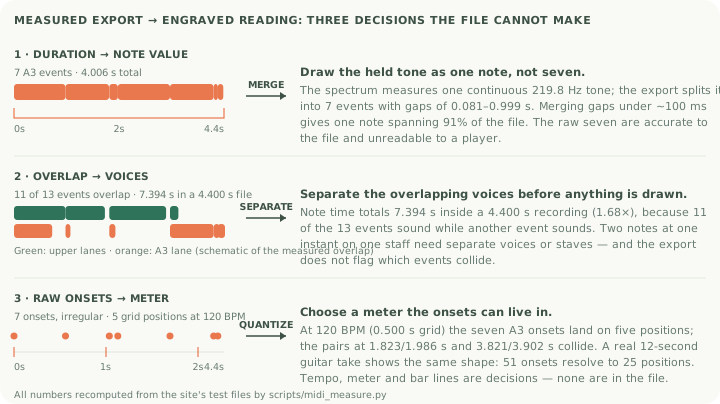
1. Draw the held tone as one note, or seven. The spectrum shows one continuous 219.8 Hz tone, but the export has seven A3 events starting at 0.000, 0.986, 1.823, 1.986, 2.985, 3.821 and 3.902 s, with gaps from 0.081 to 0.999 s. An engraver engraves intent: merge the gaps under about 100 ms and the lane becomes a single note spanning 91% of the file. Drawing the raw seven would be accurate to the file and unreadable to a player.
2. Separate the overlapping voices before anything is drawn. All thirteen events total 7.394 seconds inside a 4.40-second recording — 1.68× — because 11 of the 13 events sound while another event is still sounding. Two notes at the same instant on one staff need separate voices or separate staves; that is an engraving decision, and the export does not flag which events collide.
3. Choose a meter the onsets can live in. On a 120 BPM grid (0.500 s quarters) the seven A3 onsets land on five positions, with two pairs colliding (1.823 and 1.986 s; 3.821 and 3.902 s). Whether those pairs are flams, grace notes, or split artefacts is a musical reading, and it changes every bar line that follows. The same grid applied to a real 12-second guitar take resolves 51 onsets onto 25 positions — the collision problem is not an artefact of the synthetic file.
Where transcription ends and engraving begins
- Fix the data first. Merge the chopped low line, delete events you cannot hear in the recording, add the notes you can. Engraving a wrong event list faster just produces a clean-looking wrong chart.
- Then let the notation software engrave. Standard packages handle spacing, stems and beaming automatically — that is the mechanical half of engraving, and it is solved software.
- Check the things software gets wrong. Automatic layout does not know your band. Page turns, which staff a shared line belongs on, and whether a merged note should be a tie or a single value are decisions you make by looking at the page.
- Keep the export beside the engraving. When a player asks "is this the actual recording?", the honest answer is the file itself — all the test files on this site are downloadable for exactly that reason.
So the pipeline has two layers: transcription estimates the notes (what this site's converter does, with the error rates its test pages measure), and engraving renders them readable. A page that skips the first layer's corrections and only automates the second is where "instant sheet music" tools usually disappoint.
Questions about engraving
Is engraving the same as transcription?
No. Transcription decides which notes — the measured export found five pitches where the spectrum agrees. Engraving decides how the notes are laid out — stems, spacing, page turns. One is estimation; the other is typesetting for musicians.
Do I need engraving software?
You need notation software, which does the mechanical layout for you. Commercial engraving craft — the hand-finished look of published scores — is a further specialisation, and none of it is required to get a playable chart for your band.
Can software engrave straight from the MIDI export?
It can render it, and on this file it would render seven chopped events and 1.68× overlapping note time unless you edit first. Render after the merge-and-check step, not before.
What about handwritten charts?
Nothing on this page was measured on handwriting recognition, so no claim is made about it. The export-to-engraving path above only involves MIDI and notation software.
Can I try it on my own track?
Yes. The converter on the home page runs in your browser with no account, processes the recording on your device, and exports a standard MIDI file that any notation program opens.