Voice to MIDI: the pitch survives, the note count does not.
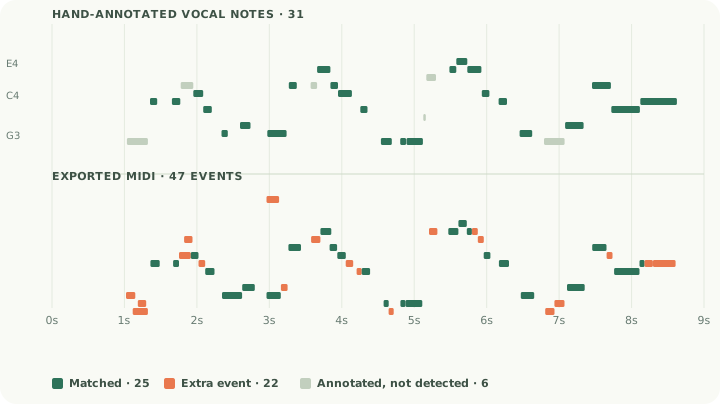
A sung or hummed line converts to MIDI, and the pitches come back reliably. On a real 8.7-second vocal take with hand-marked notes, 25 of 31 notes were found with a mean onset error of 19 ms. The trouble is the count: the export held 47 events, 22 of them extra, and 15 of those extras sit within a semitone of a note that was really sung, because vibrato and scoops move the pitch faster than any note-level model can settle. This page shows the take, the annotations, and the one setting that helps.
Convert a vocal takeA sung phrase with two independent annotations
The example is excerpt 20 from vocadito, a research dataset of solo vocal recordings released under CC BY 4.0, where every note is marked twice by different listeners. We used the 8.7-second file as it ships: mono, 44.1 kHz, one voice, no accompaniment. It holds 31 notes across 11 pitches between F#3 and E4 — a real melodic line with scoops between the notes, not a synthetic tone.
The two annotators marked 31 and 30 notes respectively and agreed on 26 of them, which is the honest ceiling for this kind of data: where a scoop becomes a note is a judgement call. The scores below are measured against the first annotation set; against the second set the same export scores 26 found, 4 missed and 21 extra. A note counts as found when the pitch is identical and the onset lands within 80 ms.
| Measure | Result |
|---|---|
| Annotated notes (two listeners) | 31 and 30; 26 agreed |
| Annotated notes found within 80 ms | 25 of 31 |
| Extra events with no annotation | 22 |
| Extras within a semitone of a sung note | 15 |
| Mean / worst onset error | 19 ms / 45 ms |
| Pitches in the take | 11, from F#3 to E4 |
The WAV version of the same take is here and its export here. Every event in both exports, with its nearest sung note and the interval between them, is in the published audit: 106 rows of CSV.
Not wrong pitches — wrong note boundaries
It helps to sort the 22 extras before trying to fix them, because they are not one kind of error.
1. Fifteen sit within a semitone of a note that was sung. Five are the same pitch re-triggered, ten are the neighbour above or below — G3 next to the F#3 that was sung, D4 next to C#4, F3 next to F#3. This is vibrato and the scoop into each note: the model reports the pitch on the way in and again at the top of the wobble. The pitch names are right; the note boundaries are wrong.
2. Two are octave doublings. A sung G3 produced G3 and G4 at the same instant, and a B3 produced B4. The second harmonic of a voice is strong, and an octave above the melody is the single easiest thing to spot and delete.
3. Two are far above anything a human sang. One event lands at E7 and one at C#7 — 42 and 38 semitones above the nearest sung note. Those are artefacts, not music, and they are the reason a vocal export can look alarming in a piano roll until you sort by pitch.
4. Two are two semitones out and one is a fifth out. The remainder, and the smallest group.
What did not happen is worth saying too: no note was reported in the wrong register overall, no phrase was dropped, and the six misses are all single notes inside a slide between two others.
Fewer, cleaner is the right default for voice
Vocal takes are exactly the material the sensitivity control was built for, because the extras are mostly confidence-threshold noise rather than missing harmony. Re-running the same MP3 through all three settings gives a clean trade-off:
| Setting | Exported | Found | Missed | Extra |
|---|---|---|---|---|
| More notes | 70 | 27 | 4 | 43 |
| Balanced (default) | 47 | 25 | 6 | 22 |
| Fewer, cleaner | 36 | 23 | 8 | 13 |
Fewer, cleaner costs you two of the 31 notes and removes nine of the 22 extras, which is the right trade for a melody you are going to play back on a synth. If the take is quiet or breathy and notes are vanishing, move one step towards More notes instead and accept the clutter.
The same four pitches, steady and with pitch sway
The real take above contains everything at once. To see the vibrato effect isolated, we also made two 4.4-second vowel-like tones with identical A3–C4–D4–E4 positions: one steady, one with a small periodic pitch sway. These are synthetic sounds, not human singing, and they exist only to separate one variable.
Both exports contained all four intended pitch names. The steady file produced 8 events; the swaying file produced 32 events — seven A3, eight C4, eight D4 and nine E4. Same pitches, four times the events. That is the same mechanism as the fifteen semitone neighbours in the real take, just amplified until it is impossible to miss.
| Input | Expected pitches | Observed output |
|---|---|---|
| Steady vowel | A3, C4, D4, E4 | 8 events; each pitch split into two |
| Same vowel with pitch sway | A3, C4, D4, E4 | 32 events; 7 A3, 8 C4, 8 D4, 9 E4 |
Record it once, fix it in four passes
- Sing one line, dry and close. No backing track, no reverb, microphone a hand's width away. A quiet room matters more than an expensive microphone, because breath noise is what generates low-confidence extras.
- Convert, then choose the setting before you convert again. Try Fewer, cleaner first on voice. The sensitivity control is applied at conversion time, so changing it afterwards does nothing to the file you already have.
- Sort by pitch and delete the octave layer. Look for a line exactly 12 semitones above the melody and remove it. On this take that is two events; on a louder, closer-miked take it will be more.
- Merge before you quantise. Join fragments of the same pitch that belong to one held note, and delete the semitone neighbours that came from a scoop. Only then snap to a grid — quantising first locks the vibrato artefacts onto the beat and makes them permanent.
- Keep the audio beside the MIDI. Play them together. Any event you cannot hear in the recording is safe to delete, and this is faster than reasoning about it.
Singing with lyrics is harder than humming: consonants interrupt the pitch, and a note-level model has no way to know that "s" is not a very short note. If the words matter, hum the melody and keep the vocal take for the arrangement.
Voice-to-MIDI questions
Can I hum into a microphone and get MIDI?
Yes. Save the recording as a supported audio file, convert it in the browser tool, then edit the estimated notes. Midilace works on a file; it is not a live microphone instrument.
Why does one sung note become several MIDI notes?
Vibrato and scoops. In the real take above, 15 of the 22 extra events were within a semitone of a note that was actually sung, and in the controlled test adding pitch sway turned four notes into 32 events. Merge the fragments that belong to one held note.
Does it work on singing with words?
Partly. Consonants and breaths produce short, low-confidence events, and the words themselves are not transcribed. For a clean melody, hum or sing on an open vowel.
Will it keep my voice or the lyrics?
No. MIDI stores pitches, timing and velocity. Your instrument plugin supplies the sound; the words stay in the recording.
Is a voice recording as accurate as a guitar?
The pitch is comparable, the note count is not. On our guitar case the export was 68 events for 45 notes; here it is 47 events for 31. Voice produces fewer extras because a single line is monophonic, but its extras are harder to spot because they are only a semitone away.