MP3 to guitar tab: the notes come from the audio, the fret numbers do not.
A conversion recovers pitches and their timing; a tab needs one more thing the audio never contains — which string and which fret. On a real 12-second guitar take, 62 of the 68 exported note events sit on a pitch that can be played in 2 to 6 different places, and one exported note has no playable place at all: a 24-fret guitar stops eight semitones below it.
6 places — E4 (MIDI 64): E2 fret 24 · A2 fret 19 · D3 fret 14 · G3 fret 9 · B3 fret 5 · E4 open.
Note events are not tablature
Run an MP3 through a transcriber and what comes out is a list of note events: a pitch, a start time, a length, a velocity. That is enough to draw a piano roll, and it is enough to play the part back on a synth. It is not enough to draw a tab, because a tab's whole content is the two numbers a note event does not carry — the string and the fret.
The gap is easy to see in the file formats. A MIDI note-on message carries a channel, a note number and a velocity; there is no field for a string or a fret anywhere in the format. Tab-aware formats do carry them: MusicXML attaches a string and a fret to a note as technical notation, and Guitar Pro files store the same pair. So the fingering is not something a converter forgot to output — it is something the intermediate format has no room for, and it has to be decided when the tab is written.
That decision is not a formality. The same note number is reachable from several strings, and the choice changes what the player's hand does, which notes can ring together, and whether a passage is playable at tempo at all.
One pitch, up to six places
The site's guitar test file is a 12-second solo passage with 45 hand-annotated notes. Transcribing it produced 68 note events covering 20 distinct pitches. For each of those pitches, the table counts how many places on a standard-tuning guitar (E2 A2 D3 G3 B3 E4, frets 0 to 24) can produce it. The count is arithmetic, not judgement: a pitch is playable on a string when the fret it needs falls between 0 and 24.
| Note | MIDI | Events in export | Playable places | Where |
|---|---|---|---|---|
| G♯2 | 44 | 2 | 1 | E2 fret 4 |
| A♯2 | 46 | 1 | 2 | E2 fret 6 · A2 fret 1 |
| D♯3 | 51 | 1 | 3 | E2 fret 11 · A2 fret 6 · D3 fret 1 |
| E3 | 52 | 3 | 3 | E2 fret 12 · A2 fret 7 · D3 fret 2 |
| F3 | 53 | 3 | 3 | E2 fret 13 · A2 fret 8 · D3 fret 3 |
| G3 | 55 | 9 | 4 | E2 fret 15 · A2 fret 10 · D3 fret 5 · G3 open |
| G♯3 | 56 | 1 | 4 | E2 fret 16 · A2 fret 11 · D3 fret 6 · G3 fret 1 |
| A3 | 57 | 5 | 4 | E2 fret 17 · A2 fret 12 · D3 fret 7 · G3 fret 2 |
| A♯3 | 58 | 6 | 4 | E2 fret 18 · A2 fret 13 · D3 fret 8 · G3 fret 3 |
| D4 | 62 | 6 | 5 | E2 fret 22 · A2 fret 17 · D3 fret 12 · G3 fret 7 · B3 fret 3 |
| D♯4 | 63 | 2 | 5 | E2 fret 23 · A2 fret 18 · D3 fret 13 · G3 fret 8 · B3 fret 4 |
| E4 | 64 | 1 | 6 | E2 fret 24 · A2 fret 19 · D3 fret 14 · G3 fret 9 · B3 fret 5 · E4 open |
| F4 | 65 | 7 | 5 | A2 fret 20 · D3 fret 15 · G3 fret 10 · B3 fret 6 · E4 fret 1 |
| G4 | 67 | 7 | 5 | A2 fret 22 · D3 fret 17 · G3 fret 12 · B3 fret 8 · E4 fret 3 |
| A4 | 69 | 3 | 5 | A2 fret 24 · D3 fret 19 · G3 fret 14 · B3 fret 10 · E4 fret 5 |
| A♯4 | 70 | 4 | 4 | D3 fret 20 · G3 fret 15 · B3 fret 11 · E4 fret 6 |
| C5 | 72 | 2 | 4 | D3 fret 22 · G3 fret 17 · B3 fret 13 · E4 fret 8 |
| A♯5 | 82 | 1 | 2 | B3 fret 23 · E4 fret 18 |
| C6 | 84 | 3 | 1 | E4 fret 20 |
| C7 | 96 | 1 | 0 | none |
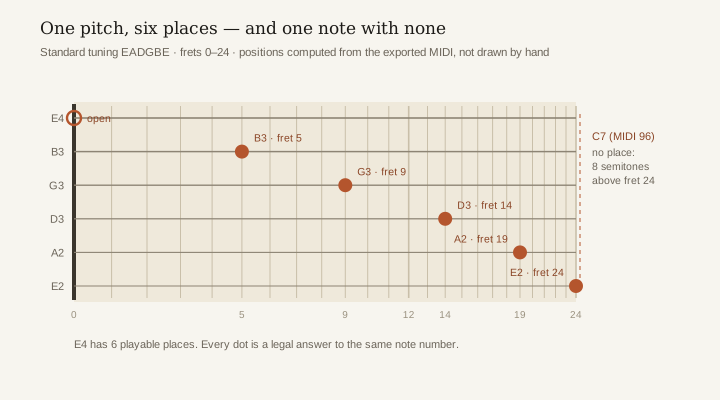
Weighted by events rather than by pitch, the picture is sharper: 62 of the 68 note events (91%) belong to a pitch with more than one place, five sit on a pitch with exactly one place, and one has none. The busiest single pitch in the take, G3, appears nine times and can be played in four places. E4 — the note most guitar music is written around — has six. Nothing in the exported file says which of those six the player actually used, because the file was never told.
The whole table is downloadable as a CSV, so the counts can be checked against the MIDI file rather than taken on trust: guitar-tab-fret-positions.csv. The script that produced it, scripts/fret_positions.py, reads the exported MIDI directly and takes the fret count as a parameter.
The note no guitar can play
The last row of that table is not a hard fingering. C7 is MIDI 96, about 2093 Hz, and a guitar in standard tuning with 24 frets reaches E6 at MIDI 88. There is no string, no fret and no capo that produces it: the note is eight semitones above the top of the instrument. A tab writer cannot choose a position for it, because there are none.
Two ranges come out of the same measurement, and they disagree. The 45 hand-annotated notes of the original performance run from MIDI 46 to 72, and every one of them is playable on a 24-fret guitar. The export runs from 44 to 96. Halving its top note gives 48, which lands inside the annotated range, and C7 at 2093.00 Hz is exactly four times the 523.25 Hz of the C5 the export itself contains. That is where the arithmetic stops being useful: at least four causes fit the same two ranges — a note written an octave or two too high, the fourth harmonic of that C5 taken as a fundamental, a high-octave voice already sitting in the source audio, or one note detected wrongly. This measurement cannot separate them, and nothing else here does either. What it does establish is narrower and still enough to act on: the top of the export is a pitch the instrument cannot produce, so it is something to check before any fingering is fixed — not a passage to practise.
The fret count is a real variable here, and it changes the count of dead notes. Repeat the same table with a 19-fret classical guitar, which tops out at B5 (MIDI 83), and the export has two unplayable pitches instead of one: C6 at MIDI 84 needs fret 20, which that instrument does not have. A tab produced against the wrong fret count is wrong before anyone plays it.
Five checks, in this order
A converted tab is a draft. The checks below are ordered so that each one only looks at what the previous one left standing — fixing fingerings on a note that should not exist wastes the effort twice.
- Check the range first. A note above the instrument's top fret (E6 at fret 24, B5 at fret 19) is not a fingering problem — no string and no fret produces it. Delete or re-octave it before touching fingering.
- Check for octave doublings. In this take the top of the range has no playable position at all; an octave-too-high note is one explanation that fits it, not the only one. However it got there, a note an octave above a real one looks plausible on a staff and impossible on a fretboard.
- Then fix positions, phrase by phrase. A pitch with four or five places is a choice, and the right one is usually the one that keeps the hand in one position for the next few notes rather than the lowest fret available.
- Check open strings. An open string is a place with no fret number, and a tab that avoids them can be technically correct and needlessly hard to play.
- Export to a format that keeps the fingering. If the fingering is going to survive, it has to leave in MusicXML or a Guitar Pro file; a MIDI export drops the string and fret again and the next person has to redo the decision.
None of this is a reason not to convert. It is the reason a converted tab is a first draft that saves the tedious pass, rather than a finished transcription. The conversion is good at the part the audio contains — pitch and timing — and silent about the part it does not. Chord names are the other half of the same gap, and they are measured separately on MP3 to guitar chords.
Questions about MP3 to guitar tab
Can an MP3 be converted to guitar tab directly?
The audio can be converted to note events — pitch, start, length — and a tab can then be written from those events. The string and fret for each note are added at the tab stage, because they are not in the audio and not in the note events either. That extra step is where a tab is won or lost.
Why does the same note appear on several strings?
Because the guitar is tuned mostly in fourths, the same pitch is reachable from more than one string at different frets. E4 can be played on the open high E string, on the B string at fret 5, on the G string at fret 9, on the D string at fret 14, on the A string at fret 19, or on the low E string at fret 24. Six legal answers to one note number.
How many places does a note usually have?
In this take, pitches with four places were the most common (six of the twenty distinct pitches), followed by five places (five pitches). Only two pitches had a single place, and both sat at the extremes of the neck — G♯2 low on the E string, C6 at fret 20 of the high E string. The full table is on this page.
What is the highest note a guitar can play?
It depends on the fret count, which is why a tab needs to know the instrument. In standard tuning the open high E string is MIDI 64, so a 24-fret guitar reaches MIDI 88 (E6) and a 19-fret classical guitar reaches MIDI 83 (B5). Anything above that is not a fingering problem.
Does a MIDI file store string and fret?
No. A MIDI note-on carries a channel, a note number and a velocity. Tab-aware formats such as MusicXML and Guitar Pro store a string and a fret per note as technical notation, which is why the fingering survives an export to those formats and disappears in a plain MIDI export.
Should I convert to MIDI first or straight to tab?
Converting to MIDI first keeps the step you can check: the note events can be compared against the recording, and a wrong octave is visible as a note number before any fingering is chosen. The site's guitar to MIDI page shows what that intermediate file contains for this same take.